31 Oct 2026 · 4 min read
3D, AI or both? How we choose the workflow for product ads
How MS3DSTUDIO chooses between full 3D, pure AI and mixed workflows for product ads, with real examples from our projects and what decides each choice.
Should a product ad be made entirely in 3D, entirely with AI, or with both? At MS3DSTUDIO we have made ads all three ways, and the answer has never been the same twice. This article explains each workflow, the projects we used it on, and what decides which one fits.
Should a product ad be all AI or all 3D?
The honest answer is neither by default. We shape the workflow for each project, starting from the ad itself rather than a favourite tool.
Over our projects, we have made ads in three ways: full 3D from A to Z, pure AI, and a mix of the two. Each time, the ad decided which way we went.
What does a full 3D product ad include?
In a full 3D ad, everything is built in 3D: the model, the animation and even the final render. The E-Swan ad and Rythmz ad were made this way.
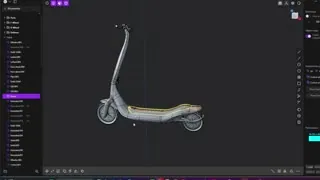
One detail surprises people: we don't always model in Blender. When a product is hard-surface, with precise curves, we model it in Plasticity, a CAD modelling tool that is very fast for this kind of shape. For E-Swan, the model was made in Plasticity, while animation and rendering stayed fully 3D.
How does a pure AI product ad work?
The second category is pure AI, from the first image to the final video. For the Cafélithic ad, the product was first modelled in Plasticity and rendered in Blender. Once that render, the guideline and the moodboard were set, the whole ad was produced with AI using Seedance.
The Nori cast iron pan was made the same way. The AER air purifier ad was also pure AI, but the device itself existed with us in 3D. Even inside an AI workflow, some things are worth locking down so the product details stay right.
Mixing 3D and AI videos side by side
The third category is a mix of AI and 3D, and it comes in two types. In the first type, we make pure 3D videos and pure AI videos and put them together in the edit.
On NovaPod and Aura, we built the whole product in 3D and rendered pure 3D videos from it. Then we used pure AI videos to show the product's look, the lifestyle around it, and how it is used.
For the NovaPod scooter, we wanted fast shots that show its details, and AI kept producing errors at that speed. So those shots were done in 3D: Ahmed, who handles environment, animation and render, placed the scooter in an HDRI environment that we generated with AI to make the job easier. For Aura, we wanted realistic characters, each in a certain colour and lifestyle, wearing the watch, so AI was the right tool for those scenes.
Using a 3D reference to guide AI video
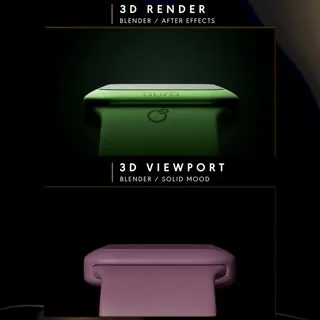
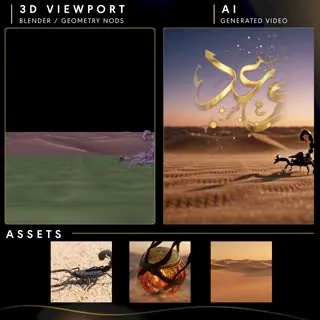
In the second mix type, we build a 3D reference and generate AI videos guided by it. These are then combined with pure AI or pure 3D videos. We block the scene in Blender with simple low-poly parts so the camera movement, the character and every element are defined before AI takes over.
The Waad perfume ad was made this way. We made 3D reference videos as guides, produced AI videos that follow them, and merged them with pure AI videos. Pure 3D was used only in the still images, not in the video. On Solace One, two scenes used a 3D reference of the device's disassembly, since we already had the device in 3D.
The Cera mug followed the same idea. We added AI scenes because they needed an environment and a character using the product, while another part of the ad was fully 3D. The two were mixed in the edit.
What decides the right workflow for your ad?
If a scene is easy, it can be generated with AI from the start, with no guide, no Blender and no other 3D software. So there is no single right way.
What decides is the product, the camera movement and the client's request. Fast shots that must show exact details may need 3D, while realistic characters and lifestyle scenes often call for AI. If you are planning an ad and not sure which way fits, send us your brief and we will walk you through it with examples from our work.
Questions
Is AI enough to make a whole product ad?
Sometimes. We have made pure AI ads such as Cafélithic and Nori. But when shots are fast and must show exact product details, AI can produce errors, so we use 3D for those shots.
Why would you build a 3D model if the ad is made with AI?
A 3D model keeps the product details accurate. We use it to lock down the product, or as a 3D reference in Blender that guides the AI on camera movement and characters.
When do you use AI in a 3D ad?
When the ad needs realistic characters, a lifestyle look or an environment with someone using the product, as in the Aura watch and Cera mug ads. AI also helped us create an HDRI environment for NovaPod.
Do you model everything in Blender?
No. Hard-surface products are often modelled in Plasticity, a CAD tool that is very fast for that type of model.